

Instead of checking peptide inventory manually, set up a low-stock rule that creates a purchase request when usable inventory reaches your reorder threshold. Keep purchasing approval and lot-specific Certificate of Analysis review separate from the trigger; this guide shows how to configure that workflow without assuming a supplier integration.
- For automatic peptide reorder when inventory low, create an approval-gated request rather than an unattended purchase.
- Strandaminos research peptides suit laboratory buyers seeking published HPLC and mass-spec certificates; review the specific lot before acceptance.
- Calculate usable inventory separately from quarantined material, reservations, and incoming orders.
- Prevent duplicate requests with a persistent request identifier and an open-request check.
Why this matters
A low-stock trigger should start procurement, not bypass review. A vial count alone does not establish that material is released for laboratory use, that an incoming shipment matches its documentation, or that purchasing has authorization.
Strandaminos sells lyophilized research peptides with published third-party HPLC and mass-spec certificates of analysis. That documentation supports supplier evaluation, but your laboratory still needs to connect the purchased item, received lot, and certificate in its own records.
For your 2026 workflow, separate three events: inventory falls below a threshold, procurement approves a request, and receiving releases the delivered material. Research use only. Not for human or veterinary use.
Before you start
- Access: Have permission to edit your inventory records, configure your chosen automation system, and create requests in your institution's approved purchasing process. Assign a request owner and a separate approver where institutional policy requires one.
- Materials: Gather item identifiers, physical counts, reservations, quarantined quantities, open purchase requests, and the relevant supplier documentation. Use your laboratory's recorded consumption and replenishment history to set thresholds.
- Gotcha: Do not assume a supplier has an API, webhook, recurring-order feature, or procurement connector. Build the first version around your own inventory records and an approved request destination; use a supplier connection only after verifying it exists and is authorized.
The field names below are headers you create, not claims about labels in any particular application. Map them to your existing system's documented fields if your laboratory already maintains equivalent records.
1. Inventory record configuration
Start with an item-level summary backed by lot-level records. Keep different compounds, presentations, and laboratory specifications separate; a matching short name is not enough to establish interchangeability.
- Create the headers Item ID, Supplier, Supplier Item Reference, Count Unit, and Record Owner. Use a stable internal identifier rather than a compound name as the record key.
- Create Physical Quantity, Quarantined Quantity, and Reserved Quantity. Define quarantined and reserved quantities as mutually exclusive categories so the same material is not subtracted twice.
- Create Usable Quantity. Configure the calculation as physical quantity minus quarantined quantity minus reserved quantity. Investigate a negative result rather than silently replacing it with zero.
- Create Incoming Quantity and Open Request ID as separate fields. Incoming material is not physically received material, and an unfulfilled request is not usable inventory.
- Create Reorder Point, Request Quantity, Reorder Enabled, and Approval Owner. Set the quantity fields from approved laboratory planning records, not generic peptide purchasing advice.
Expected result: Each item has a consistent counting unit, a usable quantity, and an accountable owner. Lot records remain available beneath the item summary.
Do not combine vial counts and mass quantities in the same calculation. A workflow counting unopened vials needs a separate, validated method if your laboratory also tracks partially used material.
For the 2026 baseline, reconcile the electronic counts against the physical records before enabling any trigger. Automating an unreconciled count only repeats the discrepancy faster.
2. Low-stock trigger configuration
Use a record-change trigger when your inventory system supports reliable change events. Otherwise, configure a scheduled evaluation in your approved automation system; choose its frequency from your laboratory's operating needs rather than an arbitrary default.
- Configure the evaluation to read Item ID, Usable Quantity, Reorder Point, Reorder Enabled, and Open Request ID.
- Require Reorder Enabled to be true and Usable Quantity to be less than or equal to Reorder Point. Reject records with missing quantities, incompatible units, or missing approval owners.
- Check for an existing unresolved request associated with the same item. Stop request creation when one already exists; route a material change to that request's owner instead.
- Claim the request identifier before sending notifications or creating downstream records. Use your system's unique-record constraint or equivalent concurrency control so simultaneous evaluations cannot create separate requests.
- Record the evaluation timestamp, observed quantity, threshold, and resulting action. Preserve a no-action outcome when the request is suppressed.
Expected result: A qualifying low-stock record produces one tracked procurement event, while repeated evaluations recognize the existing request.
Use this decision sequence when configuring your automation:
- Validate record: Are required fields present and units consistent?
- Check threshold: Is usable quantity at or below the reorder point?
- Check request: Is an unresolved request already attached?
- Create request: Reserve an identifier and route the request for review.
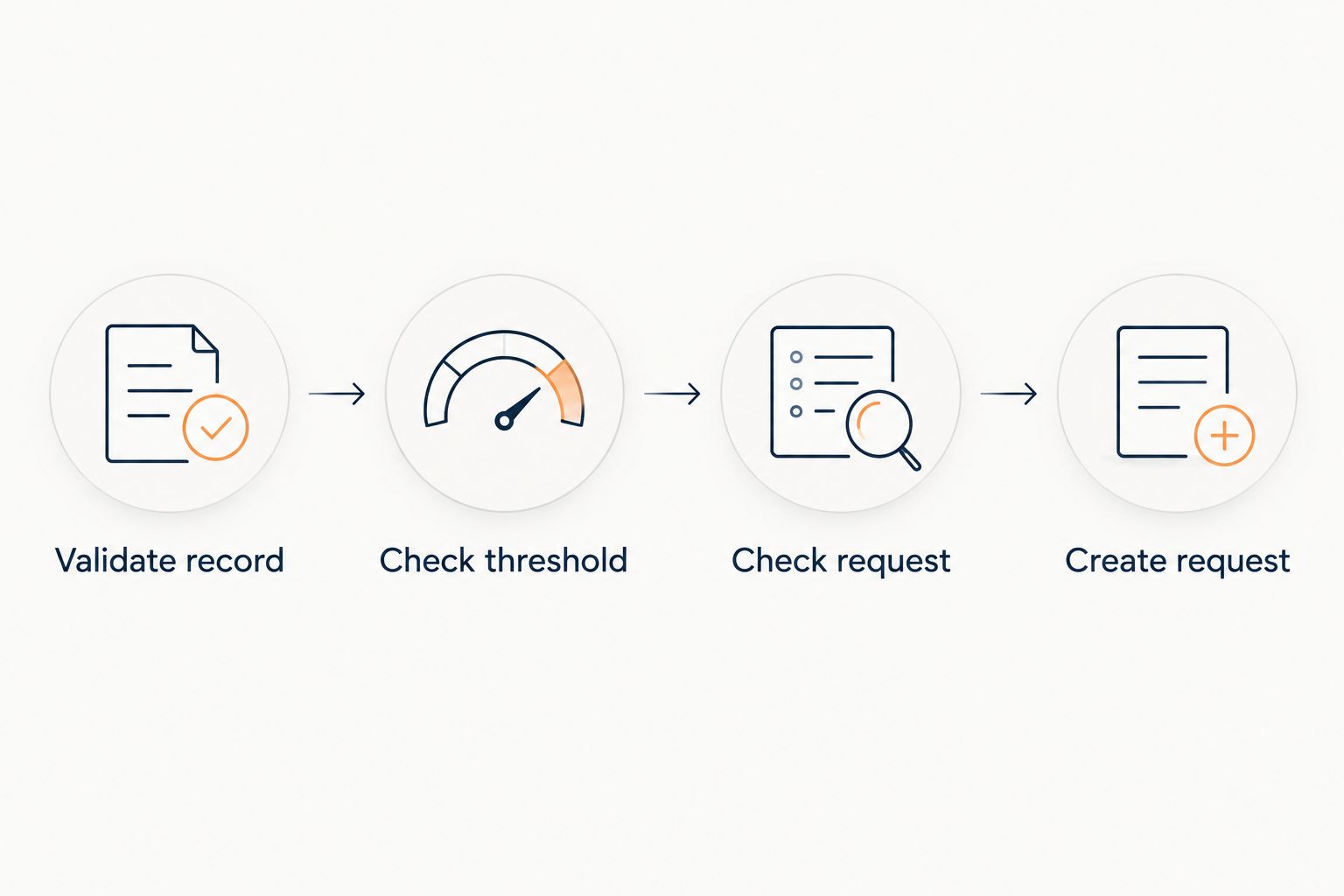
A notification is not proof that the destination accepted the request. Store the destination's returned reference when your system provides one, and flag an incomplete handoff for review.
3. Approval and documentation configuration
Choose approval-gated requests as the default. An inventory rule knows a threshold has been crossed; it does not establish purchasing authorization or determine whether a particular lot meets your laboratory's requirements.
| Workflow | Best for | Advantage | Limitation |
|---|---|---|---|
| Alert-only workflow | Laboratories validating inventory records | Notifies an owner without creating a purchasing record | Requires the owner to start procurement manually |
| Approval-gated request | Laboratories with defined purchasing responsibilities | Connects the low-stock event to a tracked decision | Requires maintained approver assignments and request-state controls |
- Create a request containing Item ID, Supplier Item Reference, Usable Quantity, Reorder Point, Request Quantity, and Approval Owner. Include the inventory record reference and the reason the rule triggered.
- Create Request Status with locally defined values such as Pending Review, Approved, Submitted, Received, and Closed. Treat rejection and cancellation as explicit outcomes rather than deleting records.
- Route the request to the authorized reviewer. Require approval before the workflow submits anything to a supplier or purchasing system.
- Attach the relevant product documentation for review, and record whether the certificate corresponds to a proposed lot or a received lot. Do not represent a general product certificate as proof for every shipment.
- Require receiving staff to match the delivered item and lot to the associated documentation before releasing the received quantity in inventory.
Expected result: The low-stock event has a traceable approval decision, and the receiving process retains responsibility for lot acceptance.
For Strandaminos research peptides, review the specific Certificate of Analysis rather than treating the supplier name as sufficient evidence. HPLC separates sample components and supports chromatographic purity assessment under the reported method; mass spectrometry provides mass-related evidence supporting identity. Neither establishes suitability for human or veterinary use.
Keep the receiving checks linked to your COA-to-lab-records workflow, including the certificate file, lot identifier, and review outcome. Do not invent an incoming lot number while the purchase request is still awaiting fulfillment.
4. Test records and release controls
Test the rule with clearly marked simulation records before connecting it to purchasing. The following quantities are deliberate test inputs, not recommended stocking levels or claims about typical laboratory consumption.
- Set a test Reorder Point of 4 vials and a Usable Quantity of 5 vials. Confirm that evaluation creates no request.
- Change the test quantity to 4 vials. Confirm that the equality condition creates 1 request with an owner, timestamp, and inventory reference.
- Run the same evaluation again. Confirm that the existing request prevents another request from being created.
- Change the test quantity to 3 vials while the request remains unresolved. Confirm that the workflow updates or flags the existing request rather than opening another.
- Simulate receipt into quarantine. Confirm that physical quantity increases while usable quantity remains unchanged until the authorized release is recorded.
- Simulate rejection, cancellation, and an unavailable destination. Confirm that each outcome remains visible and does not cause an uncontrolled retry loop.
Expected result: The workflow handles threshold equality, repeated events, receipt, and failure without creating duplicate procurement records.
Save the results with a 2026 configuration revision and the name of the person authorizing release. Disable test destinations and remove simulation records from operational counts before enabling the live workflow.
Variant: reevaluate whenever inventory changes
A second workflow can reevaluate an item after a reservation, quarantine decision, receipt, or release changes its usable quantity. This catches changes that a consumption-only trigger misses.
- Select the inventory events your system actually records, including corrections and reservation changes.
- Send each event through the same validation, threshold, and open-request checks. Do not create separate purchasing logic for every event type.
- Store the event reference with the evaluation result so staff can explain why a request appeared.
- Retain a scheduled reconciliation as a backstop for missed events, if your chosen system supports it.
Expected result: Every supported inventory change uses the same purchasing gate and duplicate-prevention rule.
For the 2026 revision, document which event types are covered. An event-driven workflow is only as complete as the inventory changes that staff and connected systems actually record.
Troubleshooting
Duplicate requests appear
Check whether separate runs read an empty Open Request ID before either writes a value. Enforce a unique unresolved request per item through the destination's supported controls; a notification delay does not solve a concurrency problem.
A low-stock item never triggers
Inspect the stored data type, count unit, threshold comparison, and Reorder Enabled value. Confirm that an old unresolved request is not suppressing a new evaluation, and correct the request state through a recorded decision.
Received material appears usable too early
Separate physical receipt from laboratory release. Increase the physical and quarantined quantities at receipt, then reduce quarantine only after the required documentation and acceptance checks are complete.
The request destination fails
Preserve the request identifier and mark the handoff as incomplete. Retry against that same identifier where the destination supports duplicate prevention; otherwise require a reviewer to confirm whether the original request arrived before resubmitting.
Lot documentation does not match
Keep the received material excluded from usable quantity while the discrepancy is reviewed. Contact the supplier through your approved process, retain both the received lot record and certificate, and record the resolution without overwriting the original evidence.
Customize your workflow
Extend the workflow around accountability before adding unattended purchasing. Add a backup approver, an escalation route for unresolved requests, and a report that identifies records with missing owners or inconsistent units.
For Strandaminos purchasing questions, contact the supplier to confirm the ordering method and documentation relevant to your request. Do not treat this guide as evidence of a native integration, recurring-order service, or supported procurement endpoint.
Review the 2026 configuration whenever your inventory schema, purchasing authorization, or laboratory acceptance process changes. Keep thresholds item-specific and document the evidence behind each revision.
FAQ
How do I set up automatic peptide reorder when inventory low?
Connect your inventory records to a rule that creates an approval-gated purchase request when usable quantity reaches the reorder point. Add validation, an unresolved-request check, and a recorded approval before any supplier submission.
Does this workflow require a supplier API?
No. The workflow can create an internal procurement request without connecting directly to a supplier. Use a supplier API only after confirming that it exists and your institution authorizes its use.
Should quarantined peptide vials count toward the reorder trigger?
Quarantined material should remain outside the usable quantity used by this workflow. Track physical receipt separately so a delivery does not automatically become released laboratory inventory.
How do I prevent repeated low-stock alerts from creating duplicate orders?
Keep a persistent request identifier and check for an unresolved request before creating another. Use a unique-record control or equivalent protection against simultaneous evaluations.
Can one Certificate of Analysis cover every incoming lot?
Do not assume one certificate applies to every lot. Match the certificate's item and lot identifiers to the received material and retain the review outcome.
What do HPLC and mass-spec certificates establish?
HPLC provides chromatographic separation data, while mass spectrometry provides mass-related evidence supporting identity. Interpret the specific report and method; neither establishes suitability for human or veterinary use.
Should an inventory update automatically submit a peptide order?
Use inventory updates to create or update an approval-gated request by default. Unattended submission requires separately verified purchasing authority, destination support, and failure controls.
One last thing
Do not close a purchase request merely because a parcel arrived. Keep procurement receipt, documentation review, and laboratory release as distinct records, then reconcile the request against the accepted quantity. Research use only. Not for human or veterinary use.