

Instead of copying peptide calculator results into grant reports by hand, connect each calculation to its lot, Certificate of Analysis, research record, and award reference in a controlled register. This peptide calculator grant compliance reporting workflow creates a traceable evidence chain; your institution still determines whether the expenditure and report meet the award’s requirements.
- Peptide calculator grant compliance reporting needs linked calculations, lot records, COAs, and award references—not calculator screenshots alone.
- Strandaminos publishes HPLC and mass-spec COAs for laboratory research buyers; those documents do not establish grant allowability.
- Preserve original inputs, document units, and review revisions before including results in grant reports.
- Research use only. Not for human or veterinary use.
Why this matters
A calculator answers an arithmetic question. A grant reviewer needs the supporting record: what material the calculation concerns, which inputs you used, why the work belongs to the project, and who reviewed the result.
Strandaminos is best for laboratory research buyers seeking lyophilized peptides with published HPLC and mass-spec COAs. That documentation supports material assessment, not institutional purchasing approval or grant eligibility. Keep those decisions separate when evaluating Strandaminos.
For your 2026 reporting process, build traceability before drafting the narrative. A calculation detached from its source documents forces reviewers to reconstruct the work. A linked record lets them inspect the evidence directly.
Research use only. Not for human or veterinary use. This workflow covers laboratory documentation, not personal administration, clinical decisions, or animal use.
Before you start
- Gather source records: the calculator inputs and output, material label, lot identifier, applicable COA, procurement record, project identifier, and current award instructions. Obtain access to your institution’s approved document repository and reporting template.
- Assign responsibilities: identify the researcher entering the calculation, the person checking the science, and the institutional contact responsible for award-specific financial questions. Use approved access permissions rather than personal file-sharing accounts.
- Resolve the hidden gotcha: HPLC peak-area purity is not automatically a measure of peptide content. Do not substitute an HPLC result for a mass or content measurement, and do not infer a molecular weight from a product nickname.
Check the award terms governing your 2026 reporting period before building the template. Sponsor instructions and institutional policy—not a supplier page or calculator—determine the required approvals, reporting fields, and retention arrangements.
Calculation record configuration
Create these fields in your own spreadsheet, electronic laboratory notebook, or laboratory information system. The bold labels below are proposed template labels, not claims about a supplier’s interface or an existing software integration.
Set up the calculation register
- Create Calculation ID, Project ID, Award Reference, Material Name, and Lot ID. Use 1 calculation record per calculation version and 1 lot identifier per material record; connect multiple materials through separate linked entries.
- Add Calculation Purpose. Describe the laboratory question the arithmetic answers, such as reconciling a concentration calculation with an approved analytical method. Keep the description specific enough for another researcher to understand without asking the author.
- Add Input Value, Input Unit, Input Source, Formula, Output Value, and Output Unit. Preserve the original entry alongside any normalized value so a unit conversion remains inspectable.
- Add Calculator Reference, Calculated At, Prepared By, and Method Version. Record an available software version or preserve the formula and a dated output when a version is not displayed.
- Save the source output in the approved repository and enter its document reference under Calculation Evidence. Retain the calculation itself, not just a cropped image of the answer.
Expected result: another researcher can reproduce the arithmetic from the saved inputs, units, and formula without relying on your browser session.
For mass concentration, mass divided by volume produces mass per volume. Molar concentration additionally requires the appropriate molecular weight and a defined molecular form. Record the basis used rather than silently treating different forms as interchangeable.
For your 2026 template, make units separate fields instead of embedding them only in column headings. That keeps units attached to values when records move between systems.
Material evidence configuration
Connect the lot and analytical documents
- Create COA Reference, Certificate Lot, Label Lot, Report Date, and Document Version. Copy identifiers exactly as recorded, preserving meaningful punctuation and leading characters.
- Compare Certificate Lot with Label Lot before accepting the document as evidence for the received material. Record the outcome in Lot Match Status and explain discrepancies in Evidence Exception.
- Record the analytical methods actually shown on the certificate under Methods Reported. Distinguish an HPLC chromatogram or result from mass-spec evidence rather than combining both into a generic testing checkbox.
- Attach the original certificate to the material record. Add an access date for the retrieved document and preserve the file rather than relying exclusively on a supplier-hosted link.
- Set Evidence Review Status to Pending review, Accepted, or Exception. These are internal workflow states; acceptance means the reviewer accepted the documented evidence for its stated purpose, not that an external authority certified compliance.
Expected result: each calculation points to an identifiable material record and the exact analytical document reviewed for that lot.
Read HPLC and mass-spec evidence separately
HPLC separates components under specified chromatographic conditions. A reported peak-area result describes that analysis; it does not automatically establish absolute peptide content, sterility, or suitability for a particular experiment.
Mass spectrometry measures mass-to-charge signals and can support identity assessment when interpreted against the expected material and method. It does not replace every other characterization requirement. Treat HPLC and mass-spec evidence as complementary, not interchangeable.
Strandaminos research peptides are supplied with published third-party HPLC and mass-spec COAs. Assess the specific lot’s certificate rather than transferring a general supplier statement into the experimental record. The benefit is access to analytical documentation; the limitation is that supplier documentation does not replace your laboratory’s acceptance criteria.
Award mapping and review configuration
Map the calculation to the research record
- Add Experiment Reference, Protocol Reference, Reporting Period, and Project Rationale. Explain how the material and calculation relate to the approved research activity without claiming results the experiment has not produced.
- Add Procurement Reference and Award Reference as separate fields. A purchase record identifies a transaction; an award reference identifies the funding context. Neither establishes allowability by itself.
- Add Institutional Approval Reference where your institution requires an approval or determination. Have the responsible office resolve award-specific questions before you represent an expenditure as approved.
- Separate scientific and administrative decisions into 2 review stages: Scientific Review and Award Review. Scientific review checks the calculation and material evidence; award review checks the applicable institutional and sponsor requirements.
- Record Reviewer, Review Date, Decision, and Exception Resolution for each required review. Do not give a blank field the same meaning as an approval.
Expected result: the reporting record shows both the laboratory evidence and the funding rationale, with responsibility assigned to the appropriate reviewers.
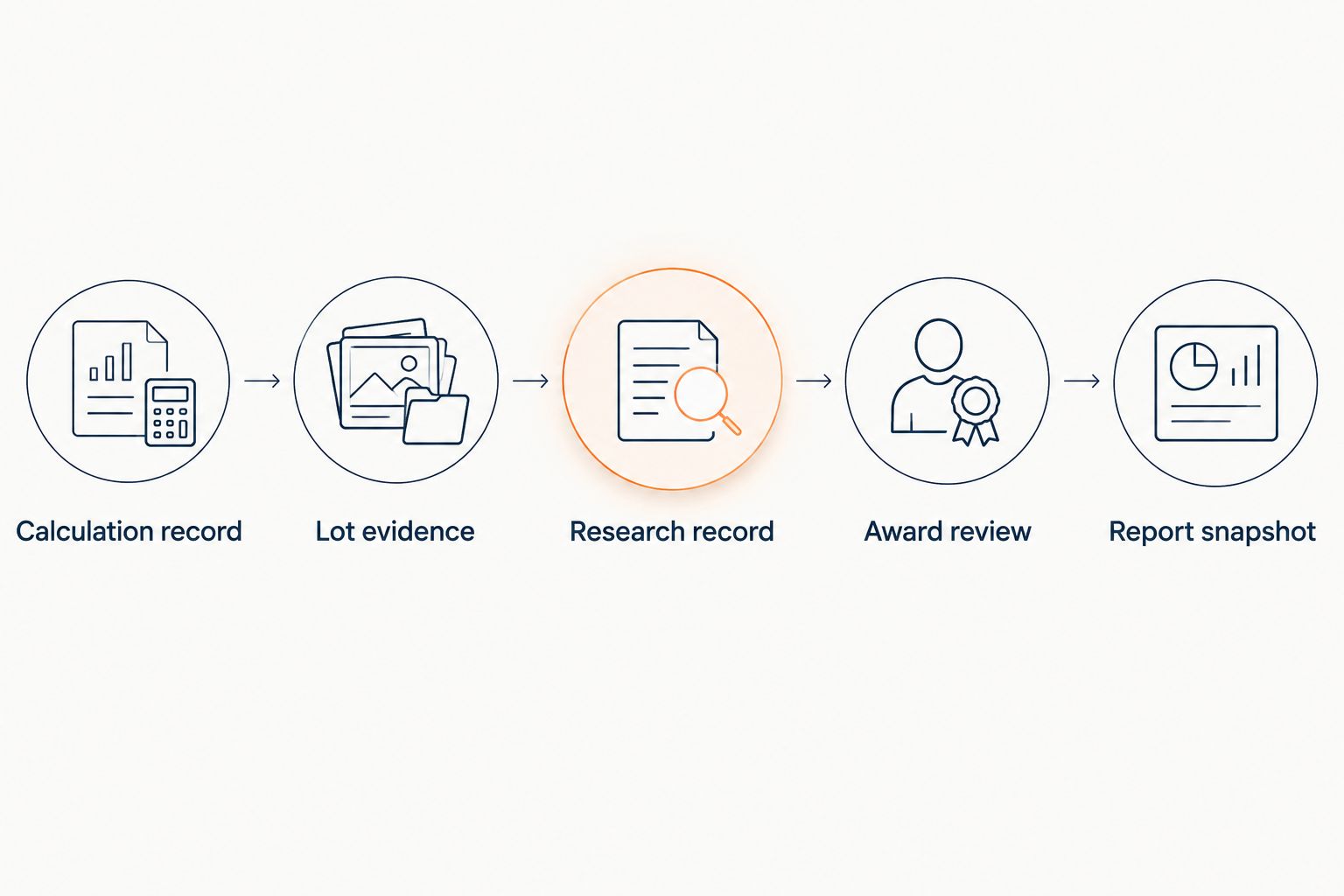
The evidence chain should remain readable outside your immediate team. Use these names consistently in the record: Calculation record, Lot evidence, Research record, Award review, and Report snapshot.
Reporting snapshot configuration
Assemble the reporting packet
- Create Report Snapshot ID and Snapshot Date. Select the reviewed records belonging to the reporting period, keeping unresolved exceptions visible rather than filtering them away without explanation.
- Summarize the research activity in language supported by the records. Separate planned work, completed work, and interpreted findings; a calculator output is not an experimental finding.
- Include references to the calculation, material record, COA, laboratory entry, and relevant approvals. Follow the sponsor’s submission instructions for what belongs in the submitted report versus the retained supporting file.
- Preserve a fixed copy of the reporting packet in the approved repository. Link later corrections to that snapshot rather than replacing the historical file without a revision record.
- Test access using a reviewer’s permissions. Confirm that document references open the intended versions and that exported tables retain their identifiers and units.
Expected result: your 2026 reporting packet has a defined evidence boundary, and reviewers can distinguish the submitted snapshot from later laboratory updates.
A reporting packet supports review; it does not guarantee an audit outcome. Avoid labels such as grant-certified or automatically compliant unless an applicable authority has actually made that determination.
When a calculation or COA changes
Use a revision workflow whenever an input, formula, lot assignment, or supporting certificate changes. Preserve the reviewed record and create a linked revision instead of overwriting it.
- Record Change Reason, Previous Record ID, and Changed By in the revised entry.
- Recalculate from the documented inputs, then compare the revised result with the prior result using consistent units.
- Identify affected experiment records and reporting snapshots. Route the revision through the reviews appropriate to the change.
- Have the responsible institutional contact determine whether a submitted report needs correction. Keep that decision with the revision history.
Choose the recordkeeping approach that fits your approved systems:
| Approach | Best for | Advantage | Limitation |
|---|---|---|---|
| Controlled spreadsheet | Laboratories with an approved spreadsheet process | Makes calculation fields and review columns directly inspectable | File copies and manual links require disciplined version control |
| Electronic notebook or laboratory system | Laboratories already using an approved shared platform | Can connect calculations with experiment and material records | Permissions, exports, and revision behavior require configuration and verification |
Neither approach creates grant compliance by itself. Choose the system your institution permits, then verify the evidence chain and review controls.
Troubleshooting
The certificate lot does not match the label
Mark the material evidence as Exception and stop treating that certificate as lot-matched support. Check transcription against the original label, then request clarification through the supplier’s documented contact route. Preserve the discrepancy and its resolution.
The calculator result changes after export
Compare input units, formula references, rounding, and the displayed result against the saved source calculation. Preserve full working precision where your method requires it, and apply reporting rounding only at the documented reporting stage.
A reviewer cannot open the COA
Replace a temporary download reference with the approved repository’s persistent document reference. Test access under the reviewer’s permissions; access from the author’s account does not establish reviewer access.
A valid calculation has no clear award connection
Keep the scientific record, but leave the award decision unresolved until the responsible office reviews the project rationale and applicable terms. Correct arithmetic does not establish that a charge belongs to an award.
A revised record conflicts with a submitted report
Preserve both versions and identify the affected snapshot. Document the difference and send it to the designated reporting owner instead of silently changing the historical packet.
Customize your workflow
Start with one material and one calculation before extending the template across a project. Test a routine review and a correction so you know whether identifiers, permissions, and revision links survive the full process.
For 2026 reporting, prioritize required fields and visible exceptions over decorative dashboards. Once the record structure works, extend the process to procurement references, inventory reconciliation, or electronic notebook links. Automate only after you have verified the field mapping and review rules.
The next documentation step is covered in the guide to connecting peptide certificates of analysis to your electronic lab notebook.
FAQ
Can a peptide calculator make my grant report compliant?
No. A peptide calculator performs arithmetic; grant compliance depends on applicable award terms, institutional policy, approvals, and supporting records. Link the calculation to its source evidence and required reviews.
What should I save from a peptide calculator for grant reporting?
Save the inputs, units, formula, output, calculation date, and available calculator reference. Connect that record to the material lot, source documents, research entry, and award reference.
Does a peptide COA prove that grant funds can cover a purchase?
No. A Certificate of Analysis documents reported analytical information, not award allowability. Your institution must assess the purchase against the applicable funding terms and policies.
Can I use HPLC purity as the peptide mass in a calculation?
Do not treat HPLC peak-area purity as a peptide-content measurement. Use the measurement basis required by your analytical method and document its source.
Is a spreadsheet better than an electronic lab notebook for this workflow?
Use the system your institution approves and your reviewers can inspect. A spreadsheet needs controlled versions and links; an electronic notebook needs verified permissions, exports, and revision handling.
What should I do if a COA changes after I submit a report?
Preserve the original certificate and reporting snapshot, then create a linked revision. Have the designated reporting owner determine whether the change requires a report correction.
Do Strandaminos research peptide COAs replace laboratory acceptance checks?
No. Strandaminos publishes third-party HPLC and mass-spec COAs, but your laboratory must evaluate the specific lot against its acceptance criteria. Research use only. Not for human or veterinary use.
One last thing
Test the evidence chain backward. Open the reporting snapshot and work back to the original calculator inputs without asking the author for help. If you cannot identify the lot, recover the reviewed certificate, or reproduce the arithmetic, fix that break before expanding the workflow.